What Freehold does today.
Most feature pages are fiction. This one has two labels: things Freehold does today, and things we build when a working TC asks for them. Public code means the roadmap belongs to the people who use it.
NewClaude connector
Ask Claude about your closings
Working today, on every plan. Paste one address into Claude, sign in with your Freehold account, and your assistant can search your files, tell you what's due, and look up anyone on a deal. Give it write access and it adds tasks, logs notes, and moves a status without you opening the dashboard.
It works in Claude on the web, the desktop and mobile apps, and Claude Code. Every change it makes lands on the file's activity trail under your own name, and one switch turns it off for everyone.
In Claude
Freehold
ConnectedAnything overdue this morning?
Two things:
- 88 Harbor Lane, survey ordered six days ago, nothing back
- 17 Cedar Court, walkthrough still unscheduled, closes Friday
Answered from your own files, not from the internet.
Handbook
Everything your team knows, where they need it
The things you'd tell someone new on their first day: which client wants a phone call when a date moves, which vendor only covers one county, whose broker reviews documents before payment. Write it down once, on the client or the contact it belongs to, and Freehold puts it in front of whoever opens the file.
Grade the people you work with A-F and say why. A note like "blamed us for a deal falling through. Don't take their work" is still there two years later, when the person who wrote it has forgotten and someone new is about to say yes.
Internal only. None of it appears in a client portal or an email. Switch it off entirely if it isn't for you, and switch off just the daily summary if you want the notes without the AI.
On the file
Worth knowing
Sunrise Realty · their client
Wants a phone call if any contract date moves, never just an email
Alexis Chen · on this file
Best reached by email; never returns calls
412 Maple Avenue · this file
Broker's office reviews the file before final payment
Written on three different records. Gathered onto one file.
Time on files
Know what every file actually costs you
Nobody starts a timer. While a transaction page is open, Freehold quietly records the minutes against that file, then shows you the numbers flat pricing usually hides: time against fee on every file, which clients absorb the most hours across your whole team, and which send the work that takes the least time per deal.
That's the difference between a flat fee that feels right and one you can prove is profitable. It's the number to know before your first hire, when someone else's salary depends on your margins being real.
A workspace switch, not an obligation. Turn it off in Settings and nothing is recorded; numbers are shown per file and per client, not as a per-person scoreboard.
On Today
Time on files
Recorded automatically. Summed per file, per client, per day.
Change the theme for your pages and client portal
Pick a colour theme in Settings and it applies to your dashboard and the client portal. The swatches below recolour this page so you can see it.
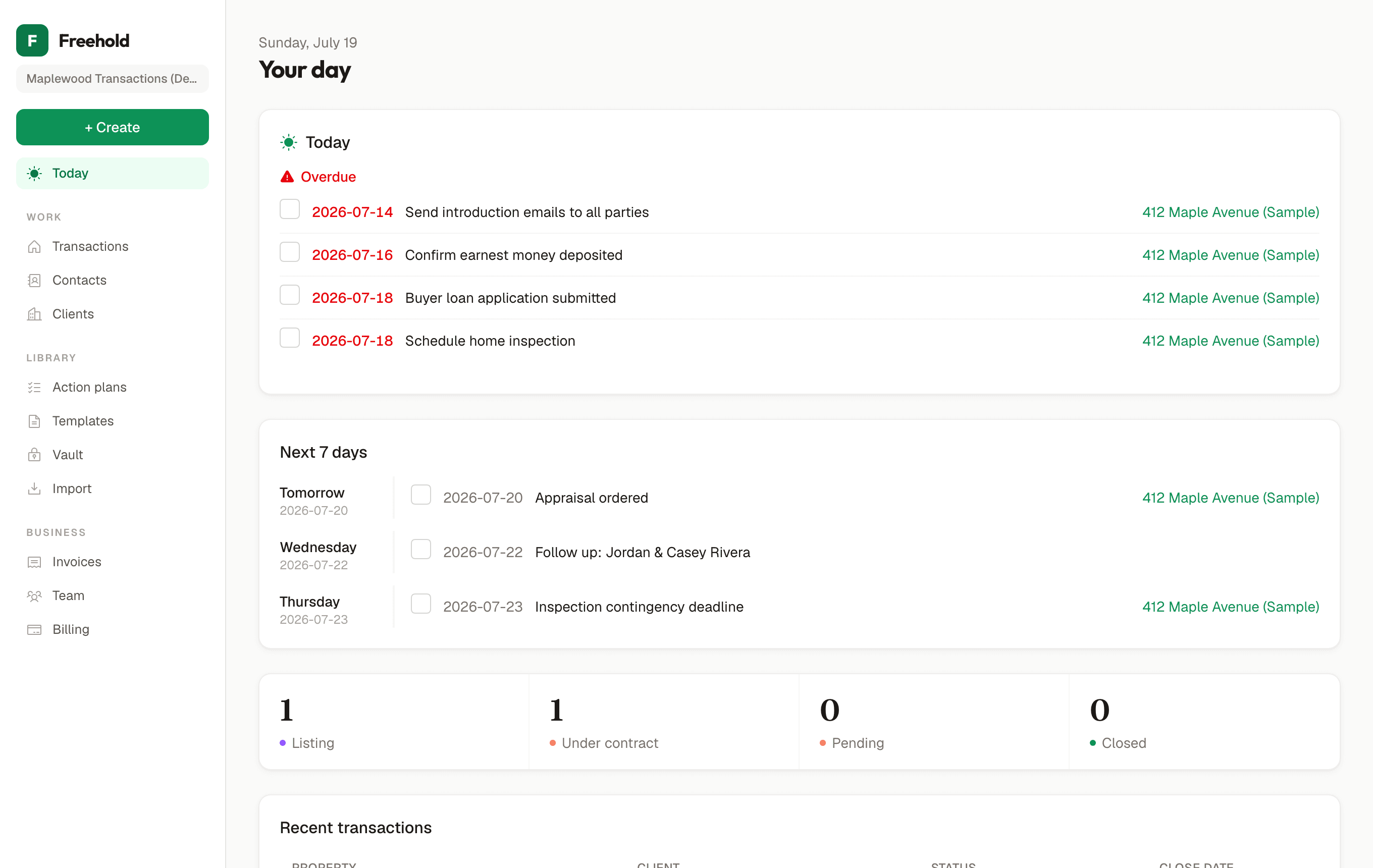
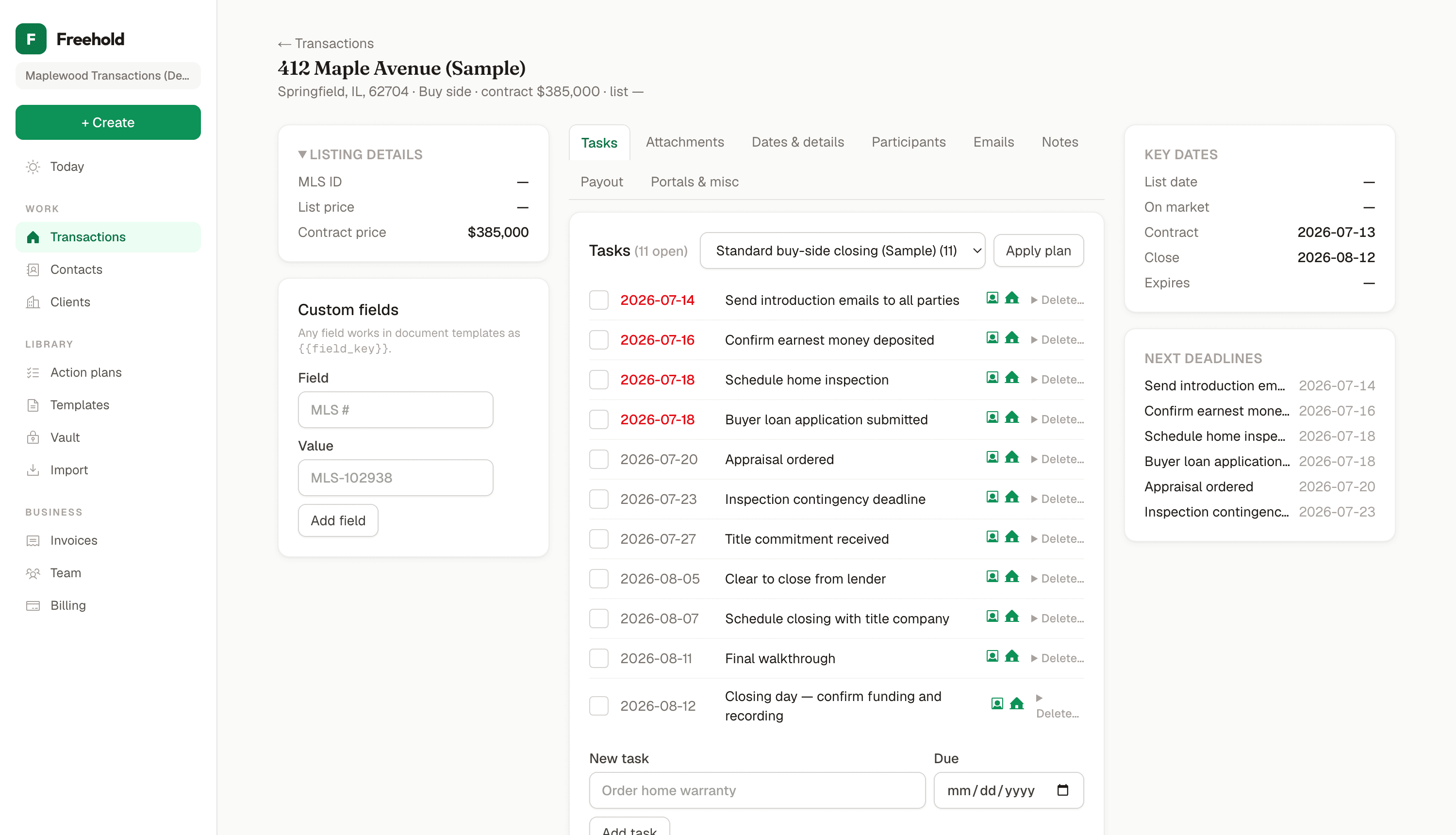
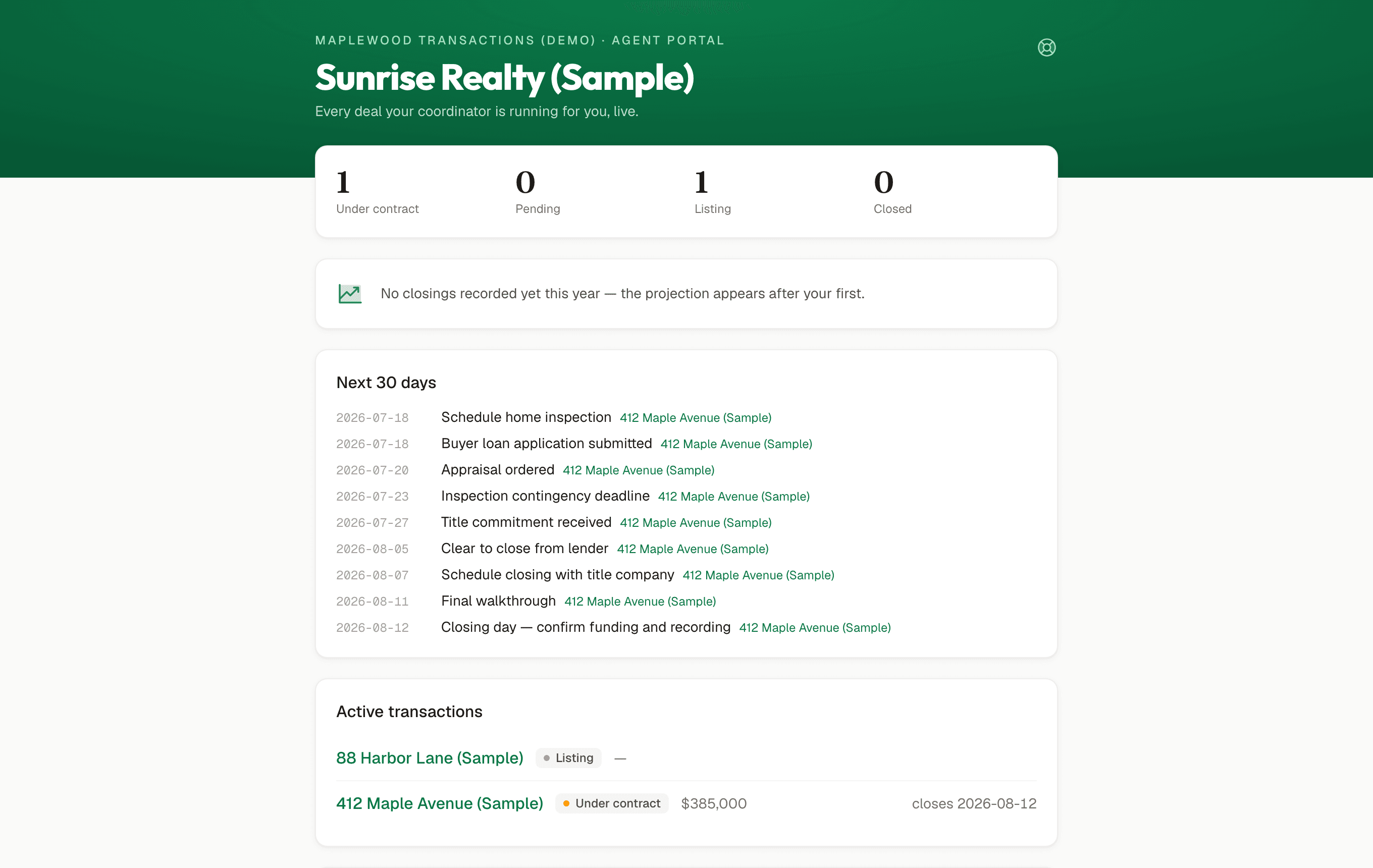
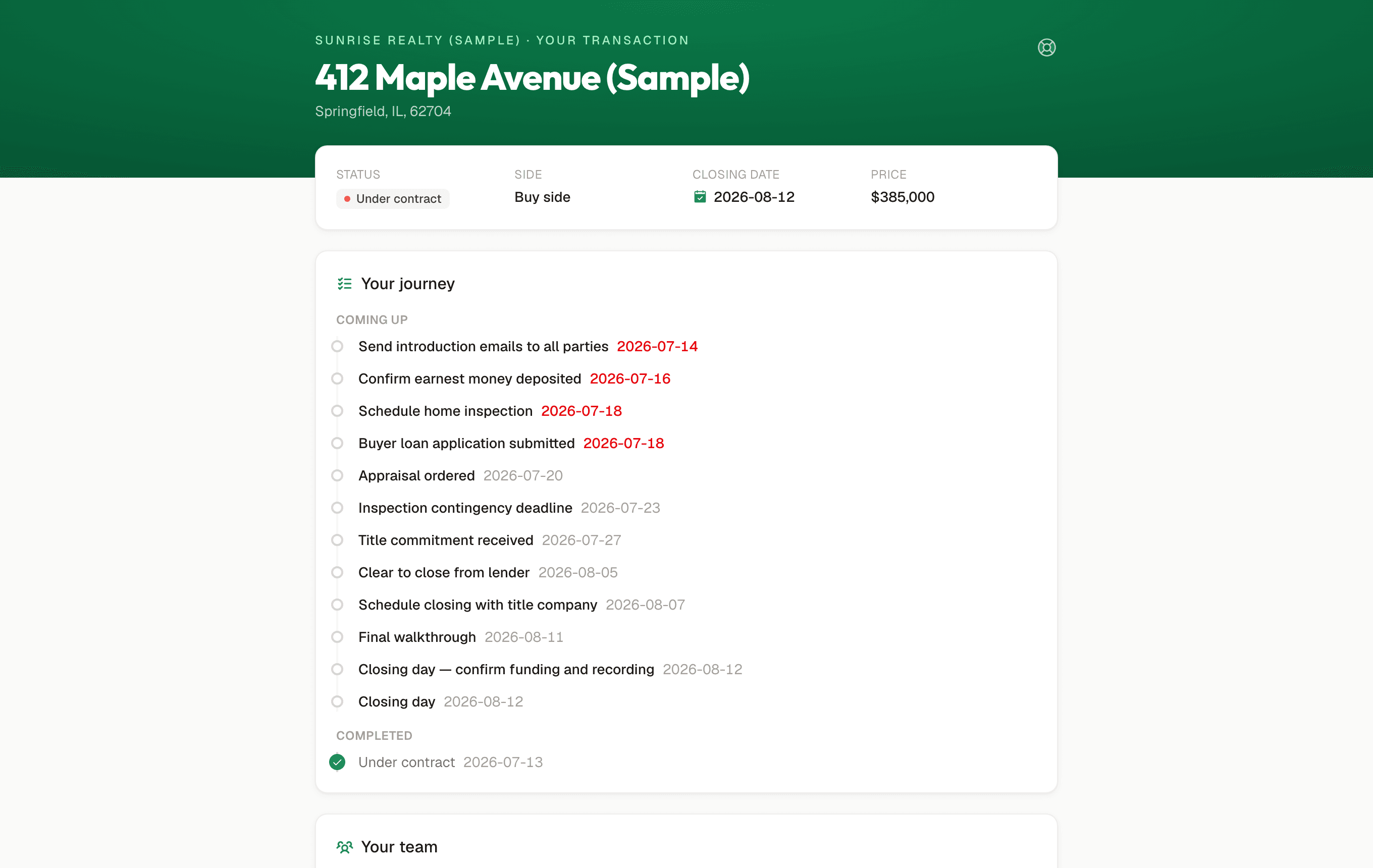
Screens from the demo workspace
Actual captures of the live product with sample data. What you see is what ships. Click around it yourself →
Only in Freehold
Talk to your workspace from Claude
Connect Freehold to Claude on the web, desktop, mobile, or Claude Code, and ask about closings this week, upcoming deadlines, or a specific client. With write access turned on it also creates tasks, logs notes, and moves a status. Working today, on every plan.
AI contract extraction
Upload the purchase agreement and every date, dollar, and party is extracted with a page citation.
Human-confirmed AI
Nothing the AI reads touches your file until you approve it, field by field.
Credential vault
Client MLS and lender logins encrypted at rest, revealed on click, every reveal audited.
The code is public
Read every line we ship and self-host free for your own organization, forever. Nobody may resell Freehold or run it as a service for others, which keeps the project funded and your platform alive.
No affiliate program
Nobody is paid a commission to recommend Freehold, so every recommendation is a real one.
The contract is the source of truth
Contract-governed dates never change silently: edits become a proposal with an amendment to-do, and the date moves only when you confirm the amendment is executed.
Dual-person contact records
One CRM entry holds a couple or a client and their assistant, so mailings and merges address both.
Time on files
Minutes accrue automatically while a file is open, with no timers to start, so you can see what each file costs against its fee, and which clients take the most and least time per deal.
Transaction management
Unlimited transactions
No per-file fees on any paid or self-hosted plan.
Document storage on every file
Contracts, amendments, and disclosures live on the transaction.
Task and action plans
Simple or complex processes, applied to any file in one click.
Deadlines that compute themselves
Template tasks anchor to the contract and close dates and land dated.
Email that comes back
Send from your workspace's address; replies thread straight onto the transaction. Your inbox stops being the system of record.
Cascading dates
Confirm an amendment and every dependent deadline re-dates itself instantly. Manually adjusted tasks stay where you put them.
Task priorities that mean it
Normal, High, Critical: your day sorts priority first, and an unresolved amendment auto-escalates to Critical two days out.
Document templates with merge fields
Letters and forms fill themselves from transaction data into a finished PDF.
Custom fields
Track any data point your market needs on any transaction.
Email templates with merge fields
A full studio: a 14-template starter library organized by category, merge fields for every party, and per-workspace editing of every word.
Built-in e-signature
Send any document for signature straight from the file. Freehold runs its own OpenSign instance, so it's included on every plan: no separate account to create, no vendor contract, no per-envelope fee. Bring your own Documenso or DocuSign account instead if you'd rather.
CRM
Categories, grades, and auto-prospecting
Tag contacts, grade relationships A-D, and Freehold queues who to touch and when.
Touch date reminders
Anniversaries and follow-ups so relationships don't go cold.
Clients as first-class records
The agents and brokerages you serve, with their own preferences.
Advanced search
Find anything across contacts and transactions in one box.
Targeted mass email
Keep your database engaged with bulk campaigns.
Shared contact ownership
Owner assignment with an admin switch restricting members to contacts they own.
Dashboards
Pipeline at a glance
Every open file, its stage, and what's due next.
Calendar view
A real month grid of every dated task and closing, high-priority items marked, switchable between your own and the whole team's.
Voice search
Ask out loud (“what's closing this week”, “who's the lender on Maple”) and hear the answer, from your own live data. On every page, and on client portals so buyers and agents can ask about their own file instead of calling you.
Status filters
See exactly the slice of your pipeline you need.
Saved views
Switch between custom-filtered perspectives instantly.
Column customization
Choose the fields your dashboard shows.
Workflows
Prebuilt and custom action plans
Start from a working checklist or build your own.
Task automation
Apply a plan and every deadline becomes a dated, assigned task. When the contract's dates change, open tasks cascade with them.
Email automation
Lifecycle emails send themselves: an intro when the file opens, congratulations at closing. Any task can auto-send its template when completed. Wording is editable per workspace, with per-client on/off switches.
Scheduled sends and quiet hours
Write now, deliver later: schedule any email for a future date, and set workspace quiet hours so automated emails never land at 2am. They wait for morning.
Shared team workflows
Everyone works the same file with the same live state.
Task assignment by role
New tasks route to the right person automatically.
Email templates attached to tasks
One click on any task opens a merge-filled email, with the right templates suggested for that task. A 14-template starter library covers contract-to-close, listing, and post-close, plus a formatting editor with live preview, merge-field picker, and a workspace signature and footer you set once.
Voice-to-email dictation
Talk instead of type: dictation powered by Deepgram's Nova model transcribes with excellent accuracy, punctuation and all, straight into your compose box. Paid plans; self-hosters bring their own key.
Client & agent portals
Your own website on your subdomain
Every workspace gets its own address (yourname.freeholdtc.dev) with a publishable promotional page: your logo, services, contact info, and a new-client registration form that lands in your contacts as a lead with a same-day follow-up task. Most TC platforms don't give you a website at all. See the live example at freeholdtc.dev/example-site.
Intake forms with document upload
Buyer and seller intake forms live on the client portal: legal names, lender, attorney, HOA, plus uploads like pre-approvals and deeds. Submissions land on the transaction with a review task, and every workspace can rename its sides (sell side, sale side, list side) everywhere.
Brand customization
Your logo on your website and emails, your own subdomain, even your own wording for transaction sides (sell side, sale side, list side).
Portal colour themes & fonts
Pick a colour theme and typeface for the client portal in Settings: header, buttons, and links repaint to match, and the same controls colour-code task priorities and highlight urgent rows on your dashboard. Try the live switcher at the top of this page.
Works on any phone
Dashboard and portals are responsive web: clients tap a link and it just opens. Nothing to install, nothing to update.
QR codes for your marketing
One click generates print-quality QR codes for your site: business cards, yard signs, open-house flyers. A scan becomes a registered lead.
Buyer & seller portals
A simple milestone timeline, the deal team, and documents, on a private, revocable link. No passwords.
Managed agent portals
Agents see every deal you run for them: pipeline, on-track projection, activity, closed history, files with one-click ZIP.
Per-item visibility controls
Two toggles beside every task and document decide exactly what agents and clients see.
Calendar feeds
Every portal, and every person on your team, has a subscribe-once calendar feed: dates sync to Google, Outlook, or Apple Calendar and stay current.
Audit trail
Deletions and portal access changes recorded with who and when, viewable by admins.
Analytics and reporting
Real-time pipeline visibility
Live counts by stage, straight from your data.
Team performance breakdowns
Metrics by person and team.
Built-in reports
Internal and client-facing reporting.
Client-facing TC analytics
Show your agent clients the work you do.
Security
Database-enforced isolation
Every workspace is walled off with Postgres row-level security, enforced by the database itself, not just application code.
Documents encrypted at rest
Every uploaded document (contracts, intake files, disclosures) is envelope-encrypted at the application layer before it touches storage. Direct database access yields ciphertext.
Encrypted credential vault
Client logins are envelope-encrypted at rest and revealed only on click, never stored or displayed in plaintext.
Offsite encrypted backups
Nightly encrypted database backups stored independently of the primary host, with point-in-time restore on top.
Full audit log
Sensitive actions (deletions, portal access changes, credential reveals, sent emails, integration connections) are recorded with who did them, viewable in Settings.
Signed, revocable links
Portals ride single-purpose signed links you can deactivate instantly. The same link resumes if you reactivate. Webhooks are HMAC-signed.
Nothing deletes in one click
Every destructive action requires typing DELETE, enforced on the server.
Two-factor authentication
TOTP codes from any authenticator app, with one-time backup codes. Enable it in Settings in under a minute.
Bring your own storage
Keep every document in an S3-compatible bucket you own: AWS S3, Cloudflare R2, Backblaze B2, Wasabi, or MinIO. Freehold reads and writes it, but the files live in infrastructure you control, not ours.
Your data is never locked in
Download your entire workspace, records and every document, as one archive any time. Connect your own storage and a full copy is delivered there automatically every night.
Daily briefing in your inbox
Opt in and every morning owners and admins get an emailed summary of every active transaction (status, key dates, and contact details for every party) with a PDF attached. Readable offline, so you're covered even without a connection.
Teams
Multi-user with real roles
Owners and admins manage; members coordinate. Destructive actions stay gated.
Link-based invitations
Add a teammate by sending a link.
Fair seat pricing
Add seats as you grow, change any time, no surprise jumps.
Per-task delegation
Assign individual tasks to teammates.
Record ownership tracking
See who created and owns every record.
Support tickets, right where you're working
Report an issue from any page: one box in the sidebar, tagged automatically with what you were looking at. Track replies on your own tickets page; no separate portal, no email back-and-forth.
Licensing, assignment & coordinator network
Per-state license tracking
Every user's profile holds their TC licenses by state (number, expiration, the document itself) with amber and red alerts as expiry approaches.
Unlimited file assignment
Assign any number of teammates to a transaction, each with their own role label, editable any time. No fixed two-person cap.
License enforcement by operating state
Mark which of your states require a TC license, then choose warn or block: Freehold flags (or refuses) a file with nobody licensed assigned.
Coordinator directory
Search Freehold-enabled workspaces and the public FindTCPros directory in one list, filtered by state, specialty, and software. Know who to call before you need them.
Cross-tenant engagements
Hire another Freehold workspace to cover a file: their coordinator gets scoped guest access to exactly that transaction, nothing else in your workspace.
Per-transaction pay requests
Set a fee when you assign a file. The assignee requests payment on completed work; an admin marks it paid against an itemized statement.
Client invoicing without a payment processor
Bill a client for TC services as a document, not a charge: email it, track it as an open follow-up, mark it paid however they actually paid. Route it through your own ERPNext or Wave instead and status mirrors back automatically.
Client portal
Branded buyer, seller, and agent portals
A clean read-only closing tracker carrying your agency's name.
Selective sharing
Choose per link what each person sees; revoke any time.
Checklist progress visibility
Clients watch steps complete instead of calling you.
Showing and feedback logging
Record showings and share feedback with sellers.
ShowingTime and Supra auto-import
Showing data pulled in automatically.
"On request" means days, not weeks.
Here's the math: if you need a feature to run your files, hundreds of other TCs almost certainly need the same thing. So a real request from a working TC goes straight to the top of the list, and most ship in days. Not weeks, not "on the roadmap for next year." That speed is the whole advantage of a small team building in the open over a legacy vendor.
And two things we'll always be straight with you about. First, we build what we believe makes Freehold better for TCs as a whole; if we don't think a request fits, you'll get a direct answer and our reasoning, never silence. Second, when something genuinely needs more than days, we'll tell you the honest timeline before you count on it.
Tell us what your current system does that Freehold doesn't: email hello@freeholdtc.dev or open a request on GitHub.